
AI Clothes Changer
Put a suit on a casual snap, try a new look before you buy, or dress a product model differently. Upload a photo, pick an outfit, and AI Outfit changes the clothes while keeping the face, pose and hands.
- 25 preset outfits
- Try on any clothing photo
- New background optional
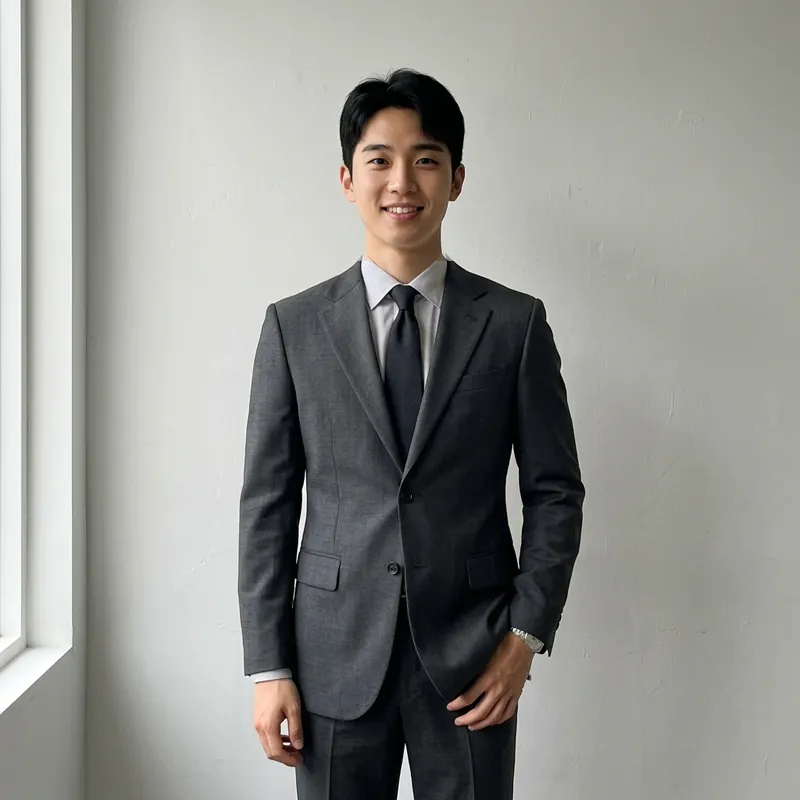 BeforeAfter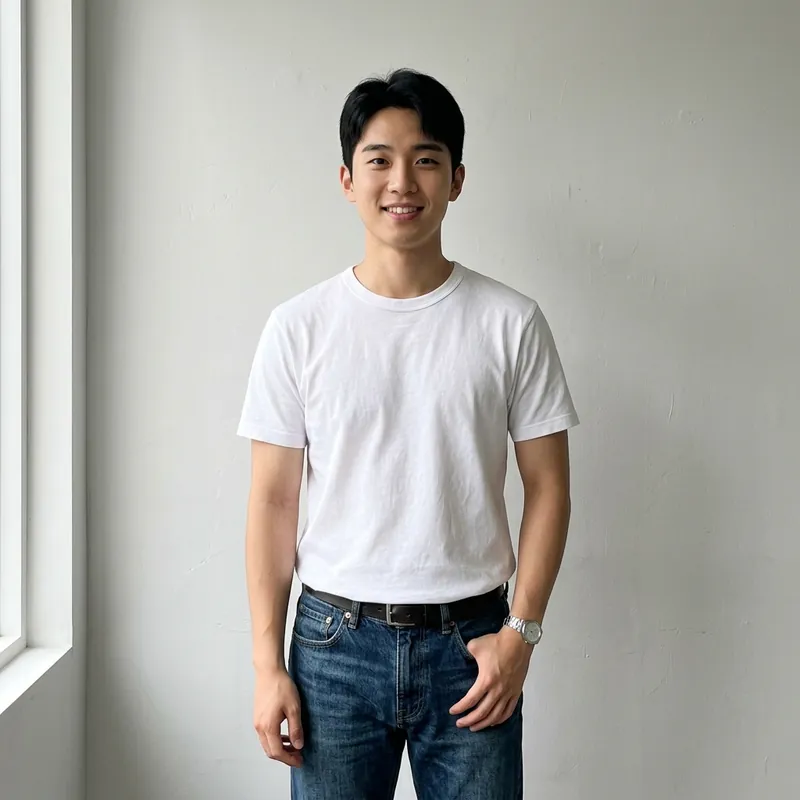
How it works
- 1
Upload a photo
Drop a photo of one person into the box above, ideally showing the upper body or more. It opens in Codia Photo Editor with AI Outfit selected.
- 2
Choose the outfit
Pick a women's or men's preset such as a suit, blazer, polo or sportswear, or choose Customize and upload a picture of the clothes you want to try.
- 3
Keep or change the background
Leave the background as it is, let AI pick a fitting setting, or choose a studio, café, street or beach scene, then generate and compare with the original.
What people use it for
Profile and ID photos
Turn a T-shirt photo into a suit or blazer look for LinkedIn, a résumé or a work badge.
Trying clothes before buying
Upload a product photo of a jacket or dress and see it on yourself before you order.
Online stores
Show one model in several outfits or colorways without booking another photo shoot.
Planning an outfit
Compare smart, casual and sporty looks for an interview, a wedding or a trip.
Content and social posts
Refresh an old photo with a new outfit and setting instead of reshooting it.
Costumes and fun
Describe a style in the prompt and try looks you would not normally wear.
01
Preset outfits for women and men
Choose from 13 women's outfits, including a grey suit, camel suit, casual blazer, sportswear and a beige skirt, and 12 men's outfits, including a charcoal suit, navy office set, olive polo, black denim and street casual. Each preset shows how the outfit looks so you can pick quickly.
02
Try on clothes from any picture
Choose Customize and upload a photo of the garment, such as a shop product shot or a picture you saved. AI Outfit uses it for the clothing design only and dresses your photo in it, without copying the reference model's face or pose.
03
Sleeves, collars and length that fit the outfit
A suit gets long sleeves even if the original photo shows bare arms, and a polo or shorts show natural skin where the outfit ends. Your face, hair, hands, pose and accessories such as a watch stay as they are.
04
Change the background in the same step
Keep the original background, let AI choose a fitting portrait setting, pick one of 13 scenes from a soft white studio to a city street or sunny beach, or upload your own background picture. You can also widen the frame to 1:1, 3:4, 4:3, 2:3 or 3:2.
Frequently asked questions
Quick answers about pricing, privacy and how the editor works. You can also try the free tools first and decide later.
How do I change clothes in a photo?
Upload the photo on this page, choose a preset outfit or upload a picture of the clothes in AI Outfit, and generate. The AI replaces the clothing and keeps the face, pose and background.
Can I put a suit on a photo?
Yes. Pick a suit or blazer preset; the new jacket gets full-length sleeves even if you wore a T-shirt in the original photo.
Can I try on clothes from a shop picture?
Yes. Choose Customize and upload the product photo. Only the clothing design is used, not the face or body of the model in the picture.
What kind of photo works best?
A clear photo of one person facing the camera, with the upper body or full body visible and the current clothes not hidden behind objects.
Is the AI clothes changer free?
Uploading your photo and the editor's basic tools are free. Each outfit change runs on Codia AI and uses credits from your Codia account; changing the background as well costs a little more, and you will be asked to sign in first.
Are my photos uploaded?
Not when you open them. Photos pass from this page to the editor inside your browser, and free tools process them on your device. A photo is uploaded only when you run an AI tool on it or save the project to your Codia account.
Do I need an account?
No account is needed to open photos and use the free tools. You will be asked to sign in when you run an AI tool or want to keep projects in your account.
Related tools
Ready to edit?
Open the editor on its own and add photos there, or drop them into the box at the top of this page.
Open AI Outfit